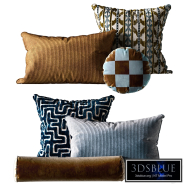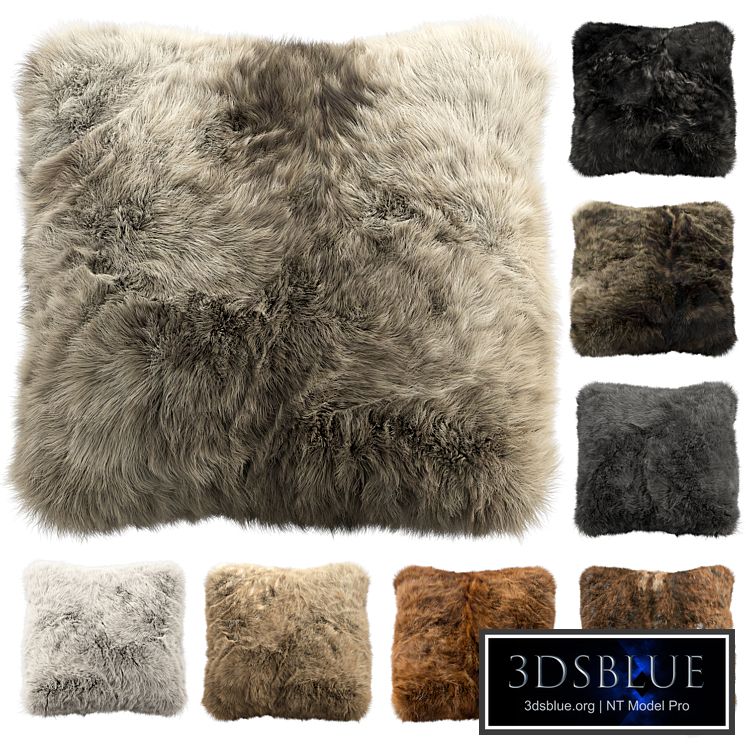
Fur pillow set 2

243 views

1 likes

120 share

  • Description
  • Comments

Fur pillow set 2

Set of decorative fur pillows of 8 pieces

Dimensions: 520 x 520 x 320 mm;

polys: 16803;
verts: 17068.

The fur is made with Hair and Fur.
Turn on the Hair and Fur modifier to display fur

For correct display: System Units Setup - Millimeters
vray: Rendering > Effects > Hair and Fur > Hair > mr prim
corona: Rendering > Effects > Hair and Fur > Hair > geometry

To reflect fur along the axes:
1. Open the model group and select the skin;
2. In the "Hair and Fur" modifier, in the "Tools" tab, select "Guides -> Splines";
3. Wait for the end of the operation to create splines, on the basis of which the fur of your reflected model will be built;
4. Created splines add to the general group of the model, close the group and reflect the model along the desired axis;
5. Ungroup, make X-FORM of all elements of the model;
6. Select the skin, in the "Hair and Fur" modifier in the "Tools" tab, select "Recomb From Splines";
7. After click on the previously created splines. As a result, the fur will be recalculated based on your splines;
8. Delete splines and close the model group.

Decoration

Fur pillow set 2

Price: 30 Diamond$ Pro

Royalty Free License


Balance: 0 accesses to PRO models


  • ID Product :

    4580834.634e713616b9a

  • Platform :

  • Render :

    Vray + Corona

  • Size :

    152 MB

  • Polygons :

  • Colors :

  • Lengh :

  • Width :

  • Height :

  • Style :

    Ethnic
  • Materials :

  • Formfactor :


Fur pillow set 2

Set of decorative fur pillows of 8 pieces

Dimensions: 520 x 520 x 320 mm;

polys: 16803;
verts: 17068.

The fur is made with Hair and Fur.
Turn on the Hair and Fur modifier to display fur

For correct display: System Units Setup - Millimeters
vray: Rendering > Effects > Hair and Fur > Hair > mr prim
corona: Rendering > Effects > Hair and Fur > Hair > geometry

To reflect fur along the axes:
1. Open the model group and select the skin;
2. In the "Hair and Fur" modifier, in the "Tools" tab, select "Guides -> Splines";
3. Wait for the end of the operation to create splines, on the basis of which the fur of your reflected model will be built;
4. Created splines add to the general group of the model, close the group and reflect the model along the desired axis;
5. Ungroup, make X-FORM of all elements of the model;
6. Select the skin, in the "Hair and Fur" modifier in the "Tools" tab, select "Recomb From Splines";
7. After click on the previously created splines. As a result, the fur will be recalculated based on your splines;
8. Delete splines and close the model group.

Similar 3D Models

Wall Panel Decor 618

Wall Panel Decor 618

30 Wall Panel Decor 618 4 250

Unity Line - Bronze Abstract Figure Sculpture

Unity Line - Bronze Abstract Figure Sculpture

30 Unity Line - Bronze Abstract Figure Sculpture 0 250

Pillow Set 06

Pillow Set 06

30 Pillow Set 06 0 250

Curtain 21

Curtain 21

30 Curtain 21 0 250

Globos Multicolored Figure

Globos Multicolored Figure

30 Globos Multicolored Figure 0 250

Wall 3D panel 40

Wall 3D panel 40

30 Wall 3D panel 40 0 250

Curtains for the children's room

Curtains for the children's room

30 Curtains for the children's room 0 250

American Style Mirror, Aliexpress

American Style Mirror, Aliexpress

30 American Style Mirror, Aliexpress 0 250

Firewood panel n2c

Firewood panel n2c

30 Firewood panel n2c 2 250

Soft Relief Wall Panel

Soft Relief Wall Panel

30 Soft Relief Wall Panel 1 250

Pictures1168

Pictures1168

30 Pictures1168 1 250

Vintage gallery wall set of 9

Vintage gallery wall set of 9

30 Vintage gallery wall set of 9 0 250

Decoration set 18 vintage set with Casa Alfarera Polka Lamp

Decoration set 18 vintage set with Casa Alfarera Polka Lamp

30 Decoration set 18 vintage set with Casa Alfarera Polka Lamp 4 250

Decorative Set 68

Decorative Set 68

30 Decorative Set 68 3 250

Decorative Set 208

Decorative Set 208

30 Decorative Set 208 0 250

Bauhaus Set 1223 7k Paintings

Bauhaus Set 1223 7k Paintings

30 Bauhaus Set 1223 7k Paintings 0 250

Infini Pearl Blue Rug

Infini Pearl Blue Rug

30 Infini Pearl Blue Rug 0 250

Vintage Picture Set ZS01

Vintage Picture Set ZS01

30 Vintage Picture Set ZS01 4 250

decorative set 67

decorative set 67

30 decorative set 67 4 250

Ceiling 17

Ceiling 17

30 Ceiling 17 0 250