Corona Sun modifier v1

17 views

likes

120 share

  • Description
  • Comments
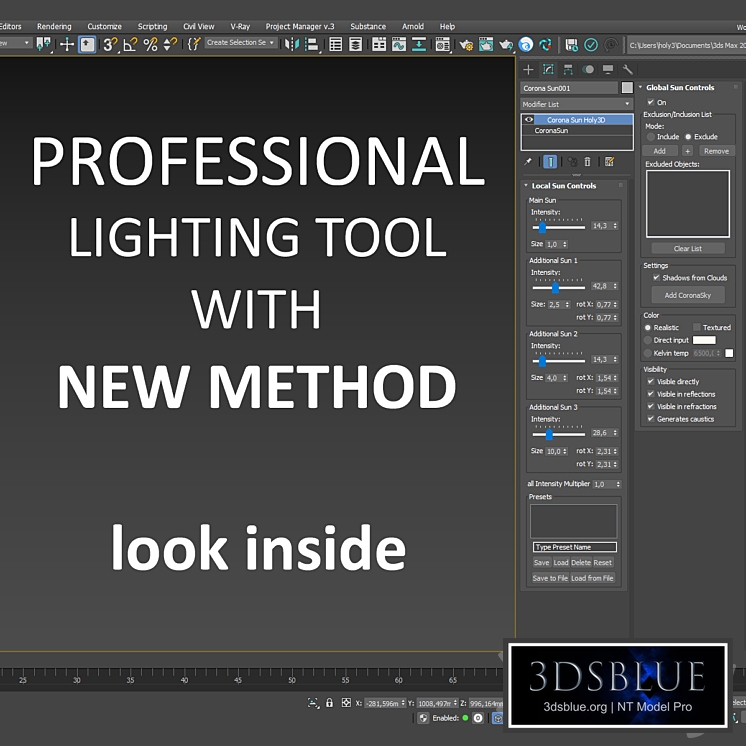
Description: This script creates a Corona Sun Holy3D modifier for the Corona Sun light source in Corona Renderer. It allows you to use multiple suns with different settings to create dramatic light and shadow effects. Key Features: Does not increase rendering time. Allows you to save and transfer artistic scene lighting settings. These settings are saved within the 3ds Max file itself and will work on other computers even without the script installed. System requirements: Tested on Corona Renderer versions 8–12 in 3ds Max 2022/2024 running Windows 10. Installation: Place the script file in the Scripts/Startup folder of your 3ds Max installation. Example path: C:\Program Files\Autodesk\3ds Max 2024\scripts\Startup Restart 3ds Max. After this, a new modifier Corona Sun Holy3D will appear in the list of modifiers. The archive also contains the Preset.xml preset for Corona Sun Holy3D from the example render. Instructions for use: Full instructions are included in the archive with the script. ------------------------------------------------------------- Description: This script creates a Corona Sun Holy3D modifier for the Corona Sun light source in Corona Renderer. It allows you to create picturesque light and shadow effects by using multiple suns with different settings. Key Features: Does not increase render time. Allows saving and transferring artistic lighting settings for the scene. These settings are saved within the 3ds Max file itself and will work on other computers even if the script is not installed. System Requirements: Tested with Corona Renderer versions 8 through 12 in 3ds Max 2022/2024 running on Windows 10. Installation: Place the script file into the Scripts/Startup folder of your 3ds Max installation. Example path: C:\Program Files\Autodesk\3ds Max 2024\scripts\Startup Restart 3ds Max. After this, a new modifier named Corona Sun Holy3D will appear in the modifier list. There is also a Preset.xml preset for Corona Sun Holy3D from the render example included in the archive. Usage Instructions: The complete instructions are included in the archive with the script.
Scripts

Corona Sun modifier v1

Price: 30 Diamond$ Pro

Royalty Free License


Balance: 0 accesses to PRO models


  • ID Product :

    8372605.69582fbc1f3fa

  • Platform :

    Script

  • Render :

    Corona

  • Size :

    3 MB

  • Polygons :

  • Colors :

  • Lengh :

  • Width :

  • Height :

  • Style :

    Modern

  • Materials :

  • Formfactor :


Description: This script creates a Corona Sun Holy3D modifier for the Corona Sun light source in Corona Renderer. It allows you to use multiple suns with different settings to create dramatic light and shadow effects. Key Features: Does not increase rendering time. Allows you to save and transfer artistic scene lighting settings. These settings are saved within the 3ds Max file itself and will work on other computers even without the script installed. System requirements: Tested on Corona Renderer versions 8–12 in 3ds Max 2022/2024 running Windows 10. Installation: Place the script file in the Scripts/Startup folder of your 3ds Max installation. Example path: C:\Program Files\Autodesk\3ds Max 2024\scripts\Startup Restart 3ds Max. After this, a new modifier Corona Sun Holy3D will appear in the list of modifiers. The archive also contains the Preset.xml preset for Corona Sun Holy3D from the example render. Instructions for use: Full instructions are included in the archive with the script. ------------------------------------------------------------- Description: This script creates a Corona Sun Holy3D modifier for the Corona Sun light source in Corona Renderer. It allows you to create picturesque light and shadow effects by using multiple suns with different settings. Key Features: Does not increase render time. Allows saving and transferring artistic lighting settings for the scene. These settings are saved within the 3ds Max file itself and will work on other computers even if the script is not installed. System Requirements: Tested with Corona Renderer versions 8 through 12 in 3ds Max 2022/2024 running on Windows 10. Installation: Place the script file into the Scripts/Startup folder of your 3ds Max installation. Example path: C:\Program Files\Autodesk\3ds Max 2024\scripts\Startup Restart 3ds Max. After this, a new modifier named Corona Sun Holy3D will appear in the modifier list. There is also a Preset.xml preset for Corona Sun Holy3D from the render example included in the archive. Usage Instructions: The complete instructions are included in the archive with the script.

Similar 3D Models

MaxGIS

MaxGIS

30 MaxGIS 0 250

Routart cards Actions Photoshop for creating

Routart cards Actions Photoshop for creating

30 Routart cards Actions Photoshop for creating 4 250