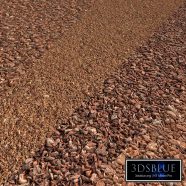
Granite paving slabs Type 11

2 views

likes

120 share

  • Description
  • Comments
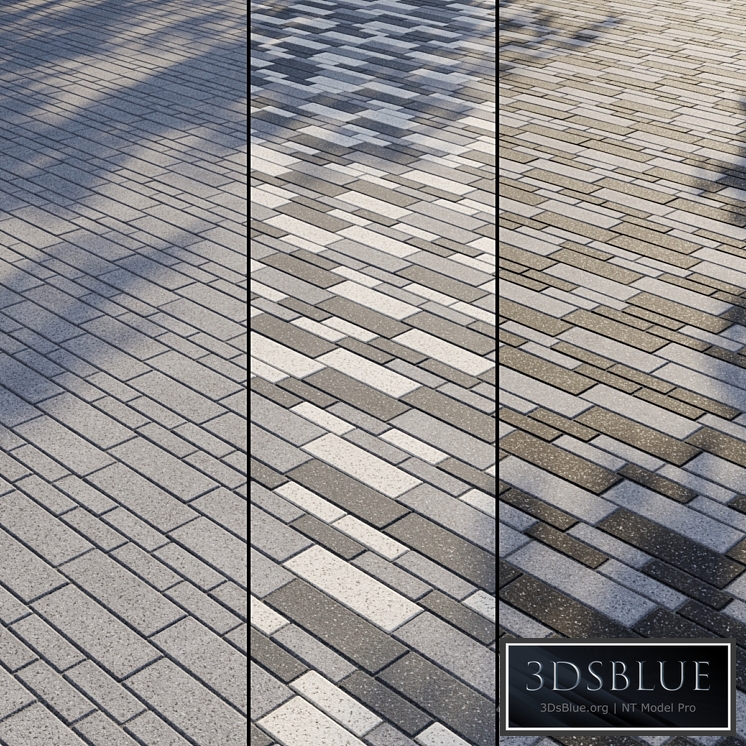
Granite paving Type 11 In the archive: Diffuse Black Diffuse Dark Gray Diffuse Gray Diffuse White Reflect Gloss Normal Bump Displace Mask Mask Pattern 1 Mask Pattern 2 Mask Pattern 3 V-Ray Material Library Corona Material Library Max V-Ray file Max Corona file OBJ file Instruction Readme Texture size: 5400 by 5760 px Real size: 5400 by 5760 mm Tile size: 60 x 180 mm, 100 x 300 mm The texture is seamless, the tiling does not catch the eye even on large areas. All textures, maps and materials have logical names in English. Texture paths have been removed. The Diffuse slot has a standard Composite card, which includes all 4 colors (Black, Dark Gray, Gray, White) and 3 pattern masks (Mask Pattern 1, Mask Pattern 2, Mask Pattern 3). This way you can simply turn on the desired tile color or create a pattern. Gray (Layer 1) color is enabled by default. You can enable the colors White (Layer 2), Dark Gray (Layer 3) or Black (Layer 4). You can enable a mask (Mask Pattern 1, Mask Pattern 2 or Mask Pattern 3) to the desired layer to get a pattern. You can combine colors and masks in any combinations by switching, replacing or dragging them. You can draw in a graphic editor and apply your pattern masks using the Mask texture. You can edit the tile separately from the seams using the Mask texture. In the archive you will find a visual diagram of working with the Composite map, which indicates where the on/off buttons of layers and masks are located. The Displacement slot is turned off – turn it on if necessary, without forgetting to turn off Normal. All my materials (of the same type) are unified with each other - you can replace or supplement one material with another, being sure that the color and texture will exactly match. You can find other paving and materials for the exterior in my profile: https://3dsky.org/users/maltsev_stepan/models If you have any difficulties, write in private messages, I will be glad to help you! ATTENTION! There is no tile geometry in the archive: You purchase a set of textures and customized materials. In the files .max is a simple Plane, with material superimposed on it. Who works in a V-Ray version lower than 3.1, be careful, there is a Microfaset GTR (GGX) in the materials in the BRDF section, if your version is older than 3.1, then the BRDF field will be empty. Choose Blinn, Phong or Ward – which is preferable for you. For Corona Render, it is recommended to install a version not lower than 1.5, since the Glossiness of materials is configured with PBR in mind. Creative success!
Architecture

Granite paving slabs Type 11

Price: 30 Diamond$ Pro

Royalty Free License


Balance: 0 accesses to PRO models


  • ID Product :

    4250068.62a31aec9e533

  • Platform :

    3dsMax 2011 + obj

  • Render :

    Vray + Corona

  • Size :

    140 MB

  • Polygons :

  • Colors :

  • Lengh :

  • Width :

  • Height :

  • Style :

    Modern

  • Materials :

  • Formfactor :


Granite paving Type 11 In the archive: Diffuse Black Diffuse Dark Gray Diffuse Gray Diffuse White Reflect Gloss Normal Bump Displace Mask Mask Pattern 1 Mask Pattern 2 Mask Pattern 3 V-Ray Material Library Corona Material Library Max V-Ray file Max Corona file OBJ file Instruction Readme Texture size: 5400 by 5760 px Real size: 5400 by 5760 mm Tile size: 60 x 180 mm, 100 x 300 mm The texture is seamless, the tiling does not catch the eye even on large areas. All textures, maps and materials have logical names in English. Texture paths have been removed. The Diffuse slot has a standard Composite card, which includes all 4 colors (Black, Dark Gray, Gray, White) and 3 pattern masks (Mask Pattern 1, Mask Pattern 2, Mask Pattern 3). This way you can simply turn on the desired tile color or create a pattern. Gray (Layer 1) color is enabled by default. You can enable the colors White (Layer 2), Dark Gray (Layer 3) or Black (Layer 4). You can enable a mask (Mask Pattern 1, Mask Pattern 2 or Mask Pattern 3) to the desired layer to get a pattern. You can combine colors and masks in any combinations by switching, replacing or dragging them. You can draw in a graphic editor and apply your pattern masks using the Mask texture. You can edit the tile separately from the seams using the Mask texture. In the archive you will find a visual diagram of working with the Composite map, which indicates where the on/off buttons of layers and masks are located. The Displacement slot is turned off – turn it on if necessary, without forgetting to turn off Normal. All my materials (of the same type) are unified with each other - you can replace or supplement one material with another, being sure that the color and texture will exactly match. You can find other paving and materials for the exterior in my profile: https://3dsky.org/users/maltsev_stepan/models If you have any difficulties, write in private messages, I will be glad to help you! ATTENTION! There is no tile geometry in the archive: You purchase a set of textures and customized materials. In the files .max is a simple Plane, with material superimposed on it. Who works in a V-Ray version lower than 3.1, be careful, there is a Microfaset GTR (GGX) in the materials in the BRDF section, if your version is older than 3.1, then the BRDF field will be empty. Choose Blinn, Phong or Ward – which is preferable for you. For Corona Render, it is recommended to install a version not lower than 1.5, since the Glossiness of materials is configured with PBR in mind. Creative success!

Similar 3D Models

fire pit

fire pit

30 fire pit 0 250

Modern Built-In Outdoor Kitchen with BBQ and Sink

Modern Built-In Outdoor Kitchen with BBQ and Sink

30 Modern Built-In Outdoor Kitchen with BBQ and Sink 0 250

Children's play complex

Children's play complex

30 Children's play complex 0 250

Fountain set 915

Fountain set 915

30 Fountain set 915 0 250

Modern house V150

Modern house V150

30 Modern house V150 0 250

A four-story house with a gable roof

A four-story house with a gable roof

30 A four-story house with a gable roof 0 250

Oval Fire Bowl - Egg

Oval Fire Bowl - Egg

30 Oval Fire Bowl - Egg 0 250

Composition with flowers and baskets

Composition with flowers and baskets

30 Composition with flowers and baskets 0 250

Three-story residential building #3

Three-story residential building #3

30 Three-story residential building #3 0 250

Firepit Zone 01

Firepit Zone 01

30 Firepit Zone 01 0 250

Auto Overpass Editable Low Poly

Auto Overpass Editable Low Poly

30 Auto Overpass Editable Low Poly 0 250

Urban Environment - Urban Furniture Bench with Plants Set 60

Urban Environment - Urban Furniture Bench with Plants Set 60

30 Urban Environment - Urban Furniture Bench with Plants Set 60 0 250

Slatted canopy canopy aluminum structure designer

Slatted canopy canopy aluminum structure designer

30 Slatted canopy canopy aluminum structure designer 0 250

Radius curb ramp

Radius curb ramp

30 Radius curb ramp 0 250

crochet pattern macrame beach umbrella

crochet pattern macrame beach umbrella

30 crochet pattern macrame beach umbrella 0 250

A-frame house 02. A-frame

A-frame house 02. A-frame

30 A-frame house 02. A-frame 0 250

Modern Semi-Detached House

Modern Semi-Detached House

30 Modern Semi-Detached House 0 250

Facade basket for air conditioner

Facade basket for air conditioner

30 Facade basket for air conditioner 0 250

Frame pool INTEX

Frame pool INTEX

30 Frame pool INTEX 0 250

Pergola canopy with swings, benches

Pergola canopy with swings, benches

30 Pergola canopy with swings, benches 0 250